Physical Address
304 North Cardinal St.
Dorchester Center, MA 02124
Physical Address
304 North Cardinal St.
Dorchester Center, MA 02124
Stop Twisting Your Forearm
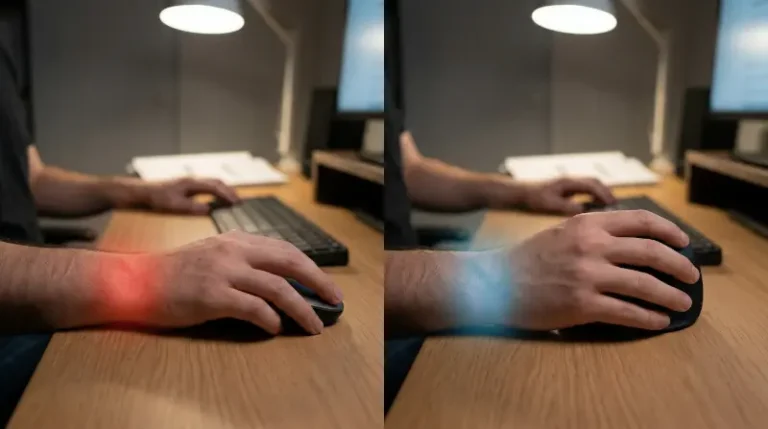
You finish a long day of coding or crunching Excel sheets. You rub your wrist. It feels stiff. Maybe your fingers tingle. This is not normal fatigue. It is your body telling you that the standard office mouse is a biomechanical disaster.
Traditional mice force you into pronation. You twist your forearm bones across each other to lay your hand flat. This compresses nerves and strains tendons. Do this for 40 hours a week, and you are asking for Carpal Tunnel Syndrome or Repetitive Strain Injury (RSI).
I look for hardware that fixes this. Logitech dominates the ergonomic space with two main contenders: the MX Vertical and the Lift. They look similar. They use the same “handshake” concept. But they are for very different users. I tested both to see which one actually saves your wrist.
Both mice use a vertical orientation. You hold them like you are shaking hands with someone. This keeps your radius and ulna bones parallel. It reduces muscular strain immediately.
The Logitech Lift uses a 57-degree angle. It is a soft entry into ergonomics. It feels natural quickly. The MX Vertical is steeper. It sits closer to 90 degrees. It forces a more aggressive neutral posture. Both kill the pronation caused by flat mice. The main difference lies in the physical footprint and who they are built for.
You cannot ignore physics here. If the mouse is too big, you overextend your fingers. If it is too small, you claw it. Clawing defeats the purpose of an ergonomic mouse.
The Logitech Lift is compact. It targets small to medium hands. If your hand width is under 3.5 inches at the knuckles, this is your mouse. It promotes a relaxed grip. It also comes in a left-handed version, which is rare.
The Logitech MX Vertical is bulky. It is for large hands. If you have a span wider than a standard credit card, you need this mass. It encourages movement from the elbow rather than the wrist. This is superior for injury prevention, but it takes time to learn.
Ergonomics does not mean you sacrifice performance. I need my cursor to go exactly where I point it.
The MX Vertical wins on pure specs. It offers a higher sensor resolution. You can crank the DPI up high. This is useful if you work across multiple 4K monitors. Graphic designers might prefer the precision here. It tracks well on glass.
The Lift is no slouch. It uses a quality optical sensor. It is more than enough for data analysis, general programming, and admin work. It tracks accurately on almost any desk surface.
Hardware is useless without good drivers. Both mice use Logi Options+ software. You can remap buttons. You can set up gestures. You can configure app-specific profiles (zoom in Chrome, mute in Teams).
If you want to go deep on configuration, read this guide on mastering Logitech Options+. It turns a simple mouse into a productivity tool.
Both device support Bluetooth and the dedicated Logitech USB receivers. The MX Vertical supports “Flow.” This lets you move your cursor between two different computers seamlessly. You can copy text on a Mac and paste it on a Windows PC. For power users, this is a major asset.
Logitech took two different approaches here.
The MX Vertical costs more. You pay for the rechargeable battery, the larger chassis, and the “MX” branding. It is a flagship device.
The Lift is cheaper. It strips away the fancy internal battery and some premium materials. It feels plasticky compared to the rubberized texture of the Vertical. But for many, the smaller price tag makes it a better entry point into ergonomics.
I do not care about the marketing. I care about your tendons. If you buy the wrong size, you will still be in pain.
Buy the Logitech Lift if:
Buy the Logitech MX Vertical if:
If neither of these sounds right, you might not need a vertical mouse at all. Some people find relief with trackballs instead. You can read my comparison of vertical mice versus trackballs to see if that works better for you.
Check out our main page at ErgoInsider for more gear breakdowns. You also might want to check OSHA’s guidelines on pointer devices to see how your entire desk setup plays a role. Fix your wrist today so you can keep working tomorrow.
MX Vertical: Rechargeable via USB-C. You get about 4 months on a full charge. A quick one-minute charge gives you three hours of use. It is convenient, but batteries degrade over years.
Lift: Runs on a single AA battery. Logitech claims 2 years of battery life. In my experience, this is accurate. You swap the battery once every presidential term. It is less modern, but more reliable long-term.
The Cost of Comfort
The MX Vertical costs more. You pay for the rechargeable battery, the larger chassis, and the “MX” branding. It is a flagship device.
The Lift is cheaper. It strips away the fancy internal battery and some premium materials. It feels plasticky compared to the rubberized texture of the Vertical. But for many, the smaller price tag makes it a better entry point into ergonomics.
Which One Saves Your Wrist?
I do not care about the marketing. I care about your tendons. If you buy the wrong size, you will still be in pain.
Buy the Logitech Lift if:
You have small to medium hands.
You want a "set it and forget it" battery life.
You are budget-conscious.
You are left-handed (get the Left version).
Buy the Logitech MX Vertical if:
You have large hands.
You need high DPI for design work.
You use multiple computers at once.
You prefer a rechargeable internal battery.
If neither of these sounds right, you might not need a vertical mouse at all. Some people find relief with trackballs instead. You can read my comparison of vertical mice versus trackballs to see if that works better for you.
Check out our main page at ErgoInsider for more gear breakdowns. You also might want to check OSHA’s guidelines on pointer devices to see how your entire desk setup plays a role. Fix your wrist today so you can keep working tomorrow.