Physical Address
304 North Cardinal St.
Dorchester Center, MA 02124
Physical Address
304 North Cardinal St.
Dorchester Center, MA 02124
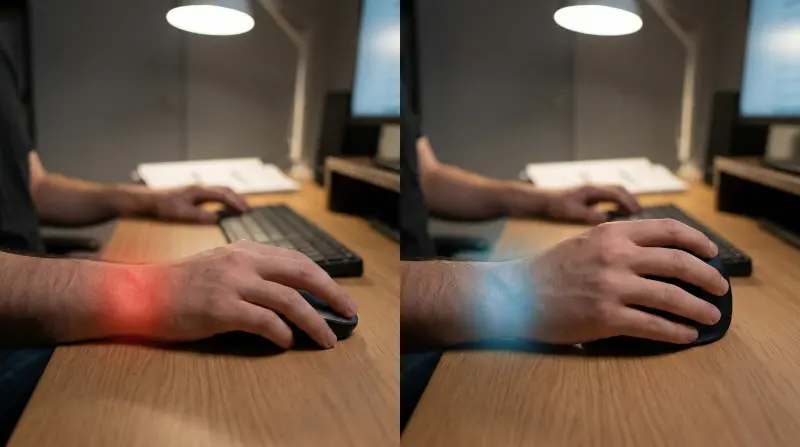
If your wrist burns after eight hours of Excel, you have a problem. You actively research ergonomic mice online. Then you see the massive price tags. Fixing a repetitive strain injury often feels like a financial luxury. You just want to write code or crunch data without sharp pain. Premium office gear from big tech brands is great. But not everyone wants to drop heavy cash on a plastic peripheral. This brings us to the ProtoArc EM03. It promises real wrist relief on a tight budget. I tested it heavily to see if it survives actual desk work.
A standard flat mouse twists your forearm uncomfortably. This unnatural posture pinches delicate wrist nerves over time. According to the National Institute of Neurological Disorders, repetitive wrist motions often cause painful medical conditions. Vertical mice fix this problem by turning your hand sideways. You hold them securely like a handshake. However, major hardware companies charge a massive premium for this shape. The ErgoInsider team sees this complaint daily. Accessibility matters. You should not have to empty your wallet to protect your tendons. The ProtoArc EM03 exists to fill this massive market gap.
The EM03 is a true vertical mouse. You slide your whole arm to guide the cursor. This is fundamentally different from a stationary trackball. If you want to compare those styles directly, check our guide on vertical mouse vs. trackball.
Out of the box, the EM03 looks sleek. The steep vertical angle forces a neutral wrist posture. Forearm strain drops almost instantly upon gripping it. The shell uses hard, somewhat cheap plastics. It feels solidly constructed but slightly hollow. The button layout makes logical sense for adult hands. Your fingers rest naturally over the heavy clickers. The center scroll wheel steps smoothly through long lines of code. It feels budget-friendly, but it avoids feeling like useless junk.
You need tight precision to drag cells in a sprawling spreadsheet. A bad optical sensor ruins the modern work experience. The ProtoArc EM03 brings a highly respectable DPI range. You adjust the cursor sensitivity via a simple top button. The baseline sensor tracks accurately across dark desk mats. It does struggle slightly on bare glass tables. Always use a dedicated mousepad for optimal daily tracking.
Connectivity relies purely on a 2.4GHz USB dongle. The wireless stability remains rock solid through a workday. I noticed zero cursor lag while navigating dense software terminals. The integrated battery easily handles weeks of hard 9-to-5 usage. You recharge it quickly via a standard USB-C cable. It handles daily programming and heavy office productivity flawlessly. Just do not try playing competitive shooters with it. The sensor is tuned strictly for steady desktop tasks.
Premium options often force you to install heavy background applications. The ProtoArc EM03 skips that annoying process entirely. It acts as a pure plug-and-play hardware device. You get basic hardware DPI adjustments built into the shell. You also get functional side buttons for web navigation. You cannot remap complex macros for dense editing workflows. There are zero advanced customization menus to navigate.
For most cubicle workers, this hardware simplicity is perfect. Your corporate IT department will not block the mouse drivers. You just plug the dongle in and start typing. If you need hyper-specific app profiles, look at other brands. If you simply want to stop your wrist from throbbing, this works.
We have to address the giant elephant in the room. How does this compare to expensive Logitech models? The ProtoArc EM03 holds its own in standard grip comfort. It gives you the exact same healthy handshake posture. It provides totally reliable left and right click functionality. However, it cannot beat a Logitech Lift on premium materials. The Lift utilizes soft-touch rubber and a quiet magnetic wheel.
Is that premium feel worth triple the actual price? For a beginner, absolutely not. If you are comparing top-tier options later, read our Logitech Lift vs. MX Vertical comparison. If you are a skeptical buyer on a tight budget, the EM03 wins. The experts at Mayo Clinic suggest positional adjustments to prevent Carpal Tunnel. A cheap vertical mouse still provides that core medical benefit.
Let us look at the raw specifications and feature trade-offs. You trade luxury materials for an incredibly accessible price.
You do not need a massive budget to fix your arm pain. The ProtoArc EM03 proves basic ergonomics can remain highly affordable. It drops the premium features but keeps the core health benefits. It tracks well across spreadsheets. It clicks reliably during heavy coding sessions. Most importantly, it gets your hand out of a twisted posture. If you want to try a vertical mouse without financial guilt, buy this. Your wrist will thank you by the end of tomorrow’s shift.